
How It Works
The question that trips most people up is how Nasde scores a run. The short answer: there are two independent kinds of scoring, and they answer different questions. The rest of this page explains both, then walks the whole pipeline stage by stage.
Two independent kinds of scoring
Section titled “Two independent kinds of scoring”- Rough tests — a deterministic pass/fail. A shell script you write (
tests/test.sh) runs after the agent finishes and emits a binary reward,1or0. Nothing AI about it. It gives a hard yes/no on correctness, but says nothing about how good the result is. - Multi-dimensional assessment — an LLM-as-a-Judge. A second coding agent reads the produced workspace and scores it on the dimensions you defined (e.g. Domain Modeling, Test Quality), with written reasoning. This is the part that turns “did it pass?” into “how good is it, on the axes I care about?”
Rough tests catch black-and-white failures. The reviewer catches everything else — whether the workspace is well-structured, respects your architecture, has meaningful tests (not coverage padding), whether a generated document is clear or a migration reversible. You need both. The stages below show where each one sits.
The pipeline, end to end
Section titled “The pipeline, end to end”flowchart LR
A["Task:<br/>instruction.md<br/>+ test.sh<br/>+ assessment_criteria.md"] --> B["Coding agent solves task<br/>in an isolated container<br/>(Docker or cloud sandbox)"]
B --> C["test.sh:<br/>initial rough tests"]
C --> D["Binary reward<br/>0 or 1"]
D --> E["Reviewer agent<br/>reads the produced<br/>workspace + trajectory"]
E --> F["Per-dimension scores<br/>vs. your criteria"]
F --> G["Results logged<br/>(locally + optional<br/>experiment tracker)"]
style E fill:#c0392b,color:#fff
One nasde run command drives this whole chain. Stage 1 (the agent doing the work in a sandbox) comes from Harbor; the optional tracking stage at the end uses Opik. Nasde is the glue that connects them, adds the reviewer stage in between, and gives you the CLI, the benchmark project layout, and the authoring skills.
1. The task — what you define
Section titled “1. The task — what you define”A task is a directory of plain files, and they are the only things you author:
instruction.md— what the agent is asked to do, in prose. This is the problem, never the solution — it describes the goal, not the diff.environment/(aDockerfile, or an auto-generated one from[nasde.source]) — the starting state of the codebase. Every run begins from this exact snapshot, so two configurations are compared on identical ground.tests/test.sh— the deterministic verifier (Stage 3 below).assessment_criteria.md+ a benchmark-wideassessment_dimensions.json— the rubric the reviewer scores against (Stage 5 below).
You don’t have to write all of these by hand — the authoring skills scaffold them, including mining real tasks from your git history. See Configuration for the full layout and file formats.
2. The agent solves it — in an isolated sandbox
Section titled “2. The agent solves it — in an isolated sandbox”Nasde hands the task to the coding agent under test (Claude Code, Codex, or Gemini CLI) running inside a fresh, isolated container — locally on Docker by default, or on a cloud sandbox provider for horizontal scale. Isolation matters for two reasons:
- Safety — the agent can
rm -rf, install arbitrary packages, or loop your test suite without touching your machine. - Fairness — every trial starts from the same clean state, so a score difference reflects the configuration (the
CLAUDE.md, the skill, the MCP server, the model, the reasoning effort), not leftover state from a previous run.
What varies between runs is exactly one thing: the variant — the agent configuration you’re testing. That’s how Nasde turns “did my skill help?” into a controlled experiment. See Configuration → variant.toml for what a variant can change.
3. Rough tests — a deterministic pass/fail
Section titled “3. Rough tests — a deterministic pass/fail”When the agent finishes, tests/test.sh runs inside the container and writes a binary reward — 1 (pass) or 0 (fail). What “passing” means is entirely up to you:
- For a bug-fix task: “the regression test that was failing now passes”
- For a refactor: “the existing test suite still passes — no behavior change”
- For a feature: “the new integration test I wrote passes”
This is the standard verifier pattern used by Harbor and other coding-agent benchmarks. It gives a hard yes/no on correctness — but says nothing about how good the result is. That’s the gap the next stage fills.
4. The reviewer agent — reading the actual work
Section titled “4. The reviewer agent — reading the actual work”This is the stage Nasde adds, and it’s why the pipeline exists. A second coding agent (claude or codex) is pointed at the produced workspace and navigates it with real tools — Read, Glob, Grep, optionally MCP analysis servers — reading only what each dimension needs rather than stuffing the whole repo into a prompt. That’s what keeps the review tractable on large codebases. It can also read the agent’s full trajectory (tool calls, tokens, timing), so your criteria can judge the process, not just the final files.
The reviewer’s reference point is two files you write when creating the benchmark:
| File | What goes in it | Who writes it |
|---|---|---|
assessment_dimensions.json | The list of dimensions to score on (e.g. Domain Modeling, Test Quality, Documentation Clarity), plus a max score per dimension | You — once, shared across all tasks in the benchmark |
assessment_criteria.md | Per-task criteria: for each dimension, what a low score looks like, what a high score looks like, what specific things to check | You — once per task, in plain prose |
You decide how strict the criteria are — spell out a ground-truth structure, enumerate exact checks, or leave room for judgment. Whatever gives you a signal you trust.
5. Per-dimension scores — against your rubric
Section titled “5. Per-dimension scores — against your rubric”The reviewer scores each dimension on whatever scale you chose, with written reasoning for each. One local nasde run handles all of it — no separate LLM-as-a-judge stack required.
The reviewer runs more than once. An LLM judge is non-deterministic — score the same workspace twice and you can get 0.61 then 0.71. So by default Nasde evaluates each trial 3 times (eval_repetitions, set in nasde.toml [evaluation] or with --eval-repetitions) and reports the mean rather than any single run. Each evaluation is kept as its own assessment_eval_<N>.json; a derived assessment_summary.json holds the per-dimension mean, standard deviation, and range. Means are computed only within a single judge model and a single rubric — a Claude review and a Codex review are different benchmarks, and so is a review run after you edited assessment_dimensions.json (the rubric is fingerprinted, so changing a dimension, its max_score, or even its description starts a fresh cluster rather than silently mixing incomparable scores). After editing the rubric, just re-run nasde eval — the new evaluations form their own cluster automatically.
When the judge’s scores feel off, you can align it with your own judgment — see Calibrating the Rubric.
Per-dimension scoring is what catches the things a single pass/fail number would hide. A radar makes it concrete — the same workspace can score high on one dimension and low on another:
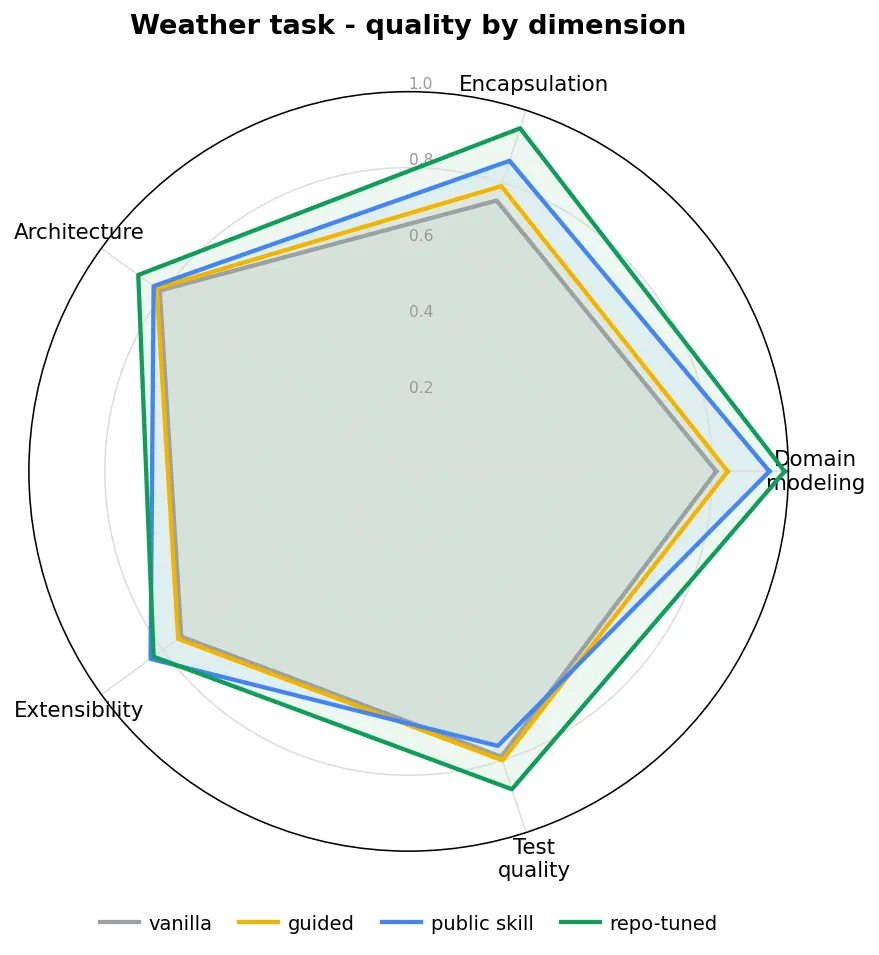
That spread (strong on architecture, weak on test quality, say) is the signal you lose the moment you collapse everything into one average. See A Real Task and Benchmark Results for the full picture.
6. Results — logged locally, optionally tracked
Section titled “6. Results — logged locally, optionally tracked”Every trial writes its artifacts to a local jobs/ directory: the scores, per-dimension reasoning, token & cost economics, the code diff, and the trajectory. The nasde run summary prints a per-configuration table (score, tokens, cost). With --with-opik the scores also flow to an Opik dashboard for browsing and comparison across runs, and nasde results-export copies the analytic essence out of jobs/ into any plain directory you want to keep.