
Token & Cost
A passing test tells you the agent can do the task. It doesn’t tell you what that capability costs. Nasde records, for every trial, how many tokens the agent burned and what that would cost in dollars.
The raw signals
Section titled “The raw signals”Nasde records the raw quality, token, and cost signals you need to compare agents and models:
- token usage — total input + output tokens for the run (price-independent; a measure of how much the model “thinks” to reach a given quality).
- cost (USD) — what those tokens cost at catalog rates. The number that matters when you’re choosing a model for a budget.
These appear in three places: the nasde run summary prints a per-(agent, model, effort) table (trials, score, tokens, $cost — with an inter-trial ±std on cost and tokens once a group has 2+ trials, a bare value at n=1); assessment_summary.json carries them per trial; and results-export copies them into metrics.json.
Quality vs. cost: the Pareto frontier
Section titled “Quality vs. cost: the Pareto frontier”This is the comparison that actually drives a model choice. Nasde measures quality and cost independently so you can see the trade-off — which model gives you the best quality for your budget — instead of collapsing it into one number that hides the picture.
Why not a single “efficiency” ratio (quality per dollar)? Because that ratio has an arbitrary zero — a score of 0 means an empty rubric, which no real run reaches — so the same data can re-order which model “wins” just by shifting where you put that zero. The trade-off is shift-invariant; a single ratio is not.
So Nasde plots the raw signals as a Pareto frontier (quality vs. cost, and quality vs. tokens). Models on the frontier are the best available trade-offs; a model above it is overpaying for its quality, one below it is buying cheap quality. You pick the point on the frontier that matches your budget and quality bar.
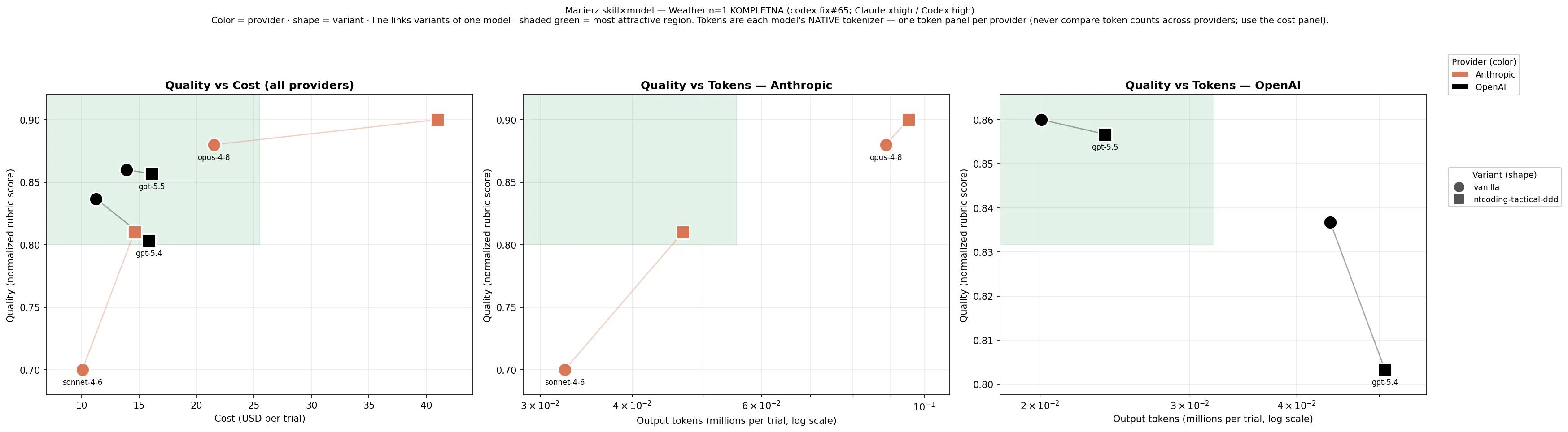
A real example from a skill×model matrix. Left panel — quality vs. cost (USD), all providers together, because dollars are a fair common unit. Color is the provider, marker shape is the variant (circle = vanilla, square = with the skill), and a line links a model’s variants. The shaded region is the most attractive corner (high quality, low cost). The two right panels are quality vs. tokens, one per provider — token counts use each provider’s native tokenizer and are not comparable across providers, so they never share a panel. Reading the left panel, gpt-5.4 and sonnet-4-6 sit cheap-but-lower, opus-4-8 buys the top score at the highest cost — which one “wins” depends entirely on where your budget and quality bar fall.
The Pareto comparison and the chart generator live in the nasde-benchmark-runner skill.
Why scores come with a ± (and why that matters)
Section titled “Why scores come with a ± (and why that matters)”A benchmark score is never perfectly repeatable — run the same setup twice and you’ll get slightly different numbers. So a bare average can lie: if config A scores 0.82 and config B scores 0.80, is A really better, or did it just get lucky this time? To answer that honestly, you need to know how much the score wobbles. That’s why Nasde always reports a score as mean ±std — the average, plus the typical wobble around it.
There are two separate sources of wobble, and Nasde keeps them apart on purpose:
-
The agent writes different code each time. Ask the same agent to solve the same task twice and it won’t produce identical code, so the scores differ. This wobble shows up as the
±stdin the run summary table, measured across your attempts (theTrialscolumn is how many attempts went into the average). Run more attempts —--attempts— and this estimate gets sharper. A single attempt is shown honestly asmean (n=1), not a fake±0.00. -
The judge scores the same code slightly differently each time. Even on identical code, the reviewer isn’t perfectly consistent. This is a different wobble, so it’s recorded per trial in
metrics.json(score_eval_std,score_eval_n).
Why split them? Because the question you actually care about is: is the gap between two configs bigger than the wobble, or is it just noise? Keeping the two sources separate lets you answer that — a 0.02 gap means nothing if each score wobbles by ±0.08. (Formal significance testing is a separate, offline step; Nasde’s job here is to surface the spread and sample size that make an average trustworthy in the first place.)
How the cost is calculated — what the API would bill
Section titled “How the cost is calculated — what the API would bill”The dollar figure Nasde reports is the cache-aware price of the run: each token volume the agent actually consumed, billed at its own catalog rate.
Most providers discount prompt caching — and in an agentic session that discount is not a lucky accident, it’s structural. Every step of the session re-sends the same growing prompt prefix, so the bulk of input tokens are cheap cache reads (on our measured benchmark grids, 93–98% of them). Pricing a run as if no cache existed sounds “safer”, but it lands several times above any real invoice — we measured a 4.4× gap on a real 24-run grid. A cost number that far from the bill can’t drive a model decision.
So Nasde prices each component separately:
- fresh input tokens — the full input rate,
- cache writes — the cache-write rate (for Anthropic’s 1-hour cache: 2× the input rate),
- cache reads — the cached-input rate (typically 0.1×),
- output tokens (the model’s reasoning/“thinking” included) — the output rate.
The number is still reproducible: it is computed from the token volumes recorded on that trial, so recomputing always gives the same answer. And if you ever want the cache-free ceiling (“what would this cost with a cold cache every step?”), it’s one multiplication away — the raw volumes stay in token_usage. See ADR-014 for the full decision record.
A model entry that lacks the cache rates simply bills those volumes at the full input rate — conservative, never a silent discount.
Where pricing comes from
Section titled “Where pricing comes from”Rates live in a small, versioned pricing.toml bundled with Nasde, each model stamped with the date and source it came from. A model entry looks like:
[models."your-model-id"]input_per_1m = 3.0output_per_1m = 15.0cached_input_per_1m = 0.30 # cache-read rate; omit → reads billed at input_per_1mcache_write_per_1m = 6.0 # cache-write rate; omit → writes billed at input_per_1mas_of = "2026-06-08"source = "https://…"A model that isn’t in the catalog still gets token metrics — only its cost_usd is left blank (with a warning), never a wrong number.
Overriding rates — drop a pricing.toml
Section titled “Overriding rates — drop a pricing.toml”The bundled catalog is the floor. To correct a rate or add a model, drop your own pricing.toml at one of two locations — Nasde finds it by name, no config setting:
<project>/pricing.toml— per-project, sits next tonasde.toml. Highest precedence.~/.nasde/pricing.toml— per-user, applies to every project on the machine.
The precedence is project > user > bundled, merged per model: each override file lists only the models you want to change or add, and every other model falls through to the layer below. Overriding one model leaves the rest of the catalog intact. (A model entry is replaced whole — fields you omit take their defaults, they aren’t inherited from the bundled entry.) When an override is applied, Nasde prints a line saying so. Both nasde run and nasde results-export read the same layered catalog, so a trial’s cost is identical whether you see it in the run summary or a later export.
# ~/.nasde/pricing.toml — your enterprise rate for one model; the rest stays bundled[models."claude-opus-4-8"]input_per_1m = 4.0 # prices use a decimal point (4.0), not a commaoutput_per_1m = 12.0as_of = "2026-06-22" # optional — when you confirmed this ratesource = "internal contract" # optional — where it came fromnasde init drops a fully-commented pricing.toml.example in a new project — copy it to pricing.toml and edit, rather than writing one from scratch.
Verifying the effective catalog
Section titled “Verifying the effective catalog”After dropping an override, always check it took effect — run pricing show with --show-source:
nasde pricing show -C ./my-benchmark --show-sourceWith a project override of claude-sonnet-4-6 (to $2.5 / $11), you’ll see it win the project layer while everything else stays bundled:
Effective pricing┏━━━━━━━━━━━━━━━━━━━┳━━━━━━━━━┳━━━━━━━━━━┳━━━━━━━━━┳━━━━━━━━━━━━┓┃ Model ┃ In / 1M ┃ Out / 1M ┃ Layer ┃ as_of ┃┡━━━━━━━━━━━━━━━━━━━╇━━━━━━━━━╇━━━━━━━━━━╇━━━━━━━━━╇━━━━━━━━━━━━┩│ claude-opus-4-8 │ $5 │ $15 │ bundled │ 2026-06-08 ││ claude-sonnet-4-6 │ $2.5 │ $11 │ project │ 2026-06-24 ││ gpt-5.4 │ $2.5 │ $15 │ bundled │ 2026-06-08 ││ gpt-5.5 │ $5 │ $30 │ bundled │ 2026-06-08 │└───────────────────┴─────────┴──────────┴─────────┴────────────┘Catching a silent miss (wrong model name)
Section titled “Catching a silent miss (wrong model name)”This is the failure mode to watch for. Suppose you typo’d the key as claude-sonnet-4.6 (dot) instead of claude-sonnet-4-6 (dashes). The override loads fine — no error — but it doesn’t match the model you actually run, so it just sits there as an extra, unused row while the real model keeps the bundled rate:
┃ Model ┃ In / 1M ┃ Out / 1M ┃ Layer ┃ as_of ┃│ claude-sonnet-4-6 │ $3 │ $15 │ bundled │ 2026-06-08 │ ← the model you run: NOT overridden│ claude-sonnet-4.6 │ $2.5 │ $11 │ project │ — │ ← your typo: a dead, unused entryThe tell-tale: the model you meant to override shows bundled, not project. Fix the key to match the model in your variant.toml and re-run pricing show.
Loud errors (malformed file)
Section titled “Loud errors (malformed file)”A broken override file never produces a wrong cost — it fails fast, naming the file and the cause. A decimal comma (2,5 instead of 2.5) is the classic one:
ERROR: could not load pricing override /path/to/my-benchmark/pricing.toml invalid TOML — Expected newline or end of document after a statement (at line 2, column 17) hint: prices use a decimal point (2.5), not a comma (2,5)A missing required field gives:
ERROR: could not load pricing override /Users/you/.nasde/pricing.toml a model is missing the required field 'output_per_1m'(The path tells you which layer to fix — your project’s pricing.toml vs the user-wide ~/.nasde/pricing.toml.)
Self-contained audit
Section titled “Self-contained audit”Every nasde results-export also writes a pricing_used.json next to the exported trials — the effective rate and source layer for each model priced in that batch:
{ "claude-sonnet-4-6": { "input_per_1m": 2.5, "output_per_1m": 11.0, "as_of": "2026-06-24", "layer": "project" }}So a report carries its own pricing provenance. The nasde run summary prints the same “Pricing used” table for the models in the run.